Chapter 1

Compiling

Common Compiling Source Code

  • Source File → Compiler → Machine-language/Object File → Linker → Executable File

Compiling Java Source Code

  • In Java, Java Source Code → Compiler → Bytecode
  • Java 不像一般编程语言直接通过编译得到machine code, 而是生成中间代码bytecode并交给JVM(Java Virtual Machine)执行/翻译给CPU,因此能做到跨平台

Anatomy of a Java Program

Comments

//Line comment:单行注释
 
/*
Paragraph comment:
单/多行注释
*/
 
 
/**
Javadoc commnet:
可以被JDK的javadoc工具提取生成程序文档
用于记录classes,data和methods
 */

Reserved words

  • 即语法词/保留词

Modifiers

  • 即修饰符
public static void main(String[] args)
/*
其中public/static/void修饰main这个method
表示这个方法具有某种访问性质/静态性质/没有返回值
*/

Statement

  • 即语句
  • Statement表示一个动作,或者一系列动作中的一个执行步骤,在Java中绝大多数的statement都以分号;结束

Blocks

  • 即代码块
  • 此处指{}中的一组程序组成部分
  • 例如:
public class Test {              // class block 开始
    public static void main(String[] args) {   // method block 开始
        System.out.println("Welcome to Java!");
    }                           // method block 结束
}                               // class block 结束        

Classes

  • 即类
  • 是Java中最基础最重要的结构之一;他是创建objects的template
  • 例如:
class Student {
    String name;
    int age;
}
//定义了一个名为Student的类,具有name/age两种data fields
//class中通常会有两类主要内容:datafield(描述对象有什么)和methods(描述对象能做什么)

Method

  • 即方法
  • 指的是一组statement的集合,用来完成某个操作
public static void main(String[] args) {
	System.out.println("Hello");
}
//此处的整个code就是一个名为main的method,包含两个statement
  • The main method: 程序开始执行的入口, Java interpreter 会通过调用main method来开始执行应用程序

Chapter 2-7

Reading input from the console

System.out.print(...)
//在控制台提示用户输入
 
Scanner input = new Scanner(System.in);
//创建一个 Scanner 对象,从键盘读取输入
 
input.nextDouble()
//读取用户输入的一个 double 数值

Programming Syntax

  • Java 里的 identifiers、variables、assignment statements与C++相同
int age = 20;
//类型 变量名 = 值
  • 特殊的是constant(常量),一旦被赋值后不能被修改
final doule PI = 3.14159;
//final 数据类型 常量名 = 值
  • 运算符与C++相同

Naming Conventions

  • 命名应该 meaningful and descriptive
  • variable和method名通常第一个单词小写,之后每个单词首字母大写(如computeArea)
  • class名则每个单词首字母都大写(如ComputeArea)
  • constant名则全部大写(如MAX_VALUE)

  • Next-line style:左大括号 { 放在声明的下一行:
public class Test
{
    public static void main(String[] args)
    {
        System.out.println("Block Styles");
    }
}
  • End-of-line style:左大括号 { 放在声明这一行的末尾,课件推荐使用这种写法:
public class Test {
    public static void main(String[] args) {
        System.out.println("Block Styles");
    }
}
  • Getting Input from Input Dialog Boxes(在scanner以外的变量输入方式):
String input = JOptionPane.showInputDialog(
    "Enter an input"
);
  • Converting Strings to Integers:
int intValue = Integer.parseInt(intSring);
  • Converting Strings to Doubles:
double doubleValue = Double.parseDouble(doubleString);

Selection statement

  • One-way if statement
if (boolean-expression){
	statement(s);
}
  • Two-way if statement
if (boolean-expression){
	statement(s-true);
}
else{
	statement(s-false)
}
  • Muti-way if statement
if (boolean-expression){
	statement(A);
}
else if(boolean-expression){
	statement(B)
}
else if...
...
else(boolean-expression){
	statement(X)
}

  • switch statement rules:根据表达式的值,从多个case中选择一个执行
switch(switch-expression){
	case value1:statement(s)1;
	break;
	case value2:statement(s)2;
	break;
	...
	default:statement(s)default
}

printf statements

  • use the printf statement get formatting output
System.out.printf(format,items);
/*
%b a boolean value
%c a character
%d a decimal integer
%f a floating-point number
%e a umber in standard scientific notation
%s a string
*/
  • For example:
int count = 5;
double amount = 45.56;
System.out.printf("the count is %d and amount is %f",count,amount);
display

Loop statements

while Loop

while(loop-continuation-condition){
	//loop body;
	Statement(s);
}
  • while会判断是否满足循环条件再开始执行

do-while Loop

do{
	//loop body;
	Statement(s);
} while(loop-continuation-condition);
  • do-while会执行一次后再判断是否满足循环条件继续执行

for Loops

for (initial-action;loop-continuation-condition;action-after-each-iteration){
	//loop body
	Statement(s)
}

Methods

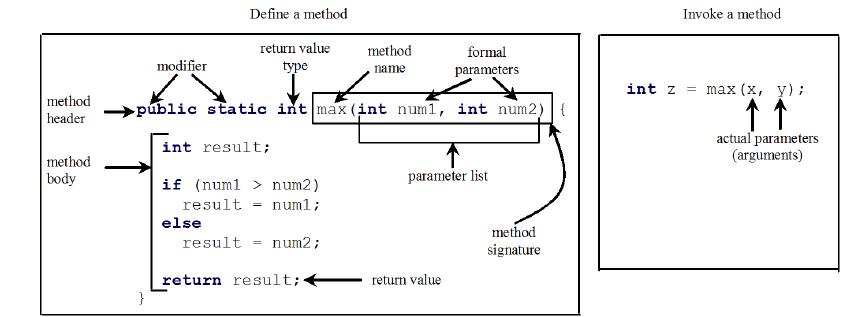
  • method是a collection of statesment用于表述一整个operation
  • method signature是method name和parameter list的结合
  • 在method header中定义的variables即为formal parameters
  • 当方法被invoke时,实际传入的variables即为actual parameters
  • 一个method可能会返回值,returnValueType代表返回值的类型,如果没有返回值则returnValueType=void

Overloading Methods

  • 当同一个类中有多个同名method,靠不同的parameter list区分调用
public class Demo {
	public static void main(String[] args) {
		System.out.println(add(1, 2));
		// 两个int → 调用 add(int, int)
		System.out.println(add(1.5, 2.5));
		// 两个double → 调用 add(double, double)
	}
 
	public static int add(int a, int b) {
		return a + b;
	}
 
	public static double add(double a, double b) {
		return a + b;
	}
}

Random methods

Math.random()   //返回一个大于等于0.0小于1.0的double value
a + Math.random()*b   //返回一个大于等于a小于a+b的number

Arrays

  • Array是一种用来表述相同数据类型的数据的数据结构

Declaring Array Variables

datatype[] arrayRefVar;
//example:
double[] myList;
  • 不推荐但可行的declaring方式
datatype arrayRefVar[];
//example:
double myList[];

Creating Arrays

arrayRefVar = new datatupe[arraySize];
//example:
myList = new double[10];

  • Declaring和Creating可以在一步中完成:
datatype[] arrayRefVar = new datatype[arraySize];
//example:
double[] myList = new double[10];

The Length of an Array

  • 当array被创建时,它的size就固定了,无法改变
arrayRefVar.length   //返回array的length

Default Values

  • numeric primitive data type的default value为0
  • char type的default value为'\u0000'
  • boolean type的default value为false

  • Declaring, creating, initializing in one step:
double[] myList = {1.9, 2.9, 3.4, 3.5};
//等价于
double[] myList = new double[4];
myList[0] = 1.9;
myList[1] = 2.9;
myList[2] = 3.4;
myList[3] = 3.5;
/*
double[] myList;
myList = {1.9, 2.9, 3.4, 3.5}; // 错误写法
*/

Enhanced for Loop

  • 用于按顺序遍历array里的所有元素,不再需要自己写index就可以遍历整个array
for (elementType value : arrayRefVar) {
    // Process the value
}
//For example
for (double value:myList):
	System.out.print(value);

Copying Arrays

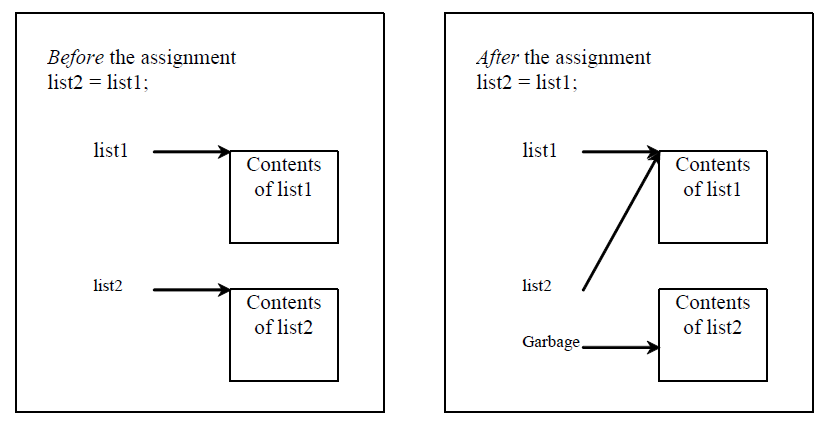
list2 = list1;
  • 需要注意,=并不能真正的复制数组内容
  • 此时的关系如图所示:

  • 真正复制数组需要使用loop,创建新的数组并逐个复制元素
//example
int[] sourceArray = {2, 3, 1, 5, 10};
int[] targetArray = new int[sourceArray.length];
 
for (int i = 0; i < sourceArray.length; i++)
    targetArray[i] = sourceArray[i];
  • 或者使用Java自带的数组复制工具System.arraycopy()
array(sourceArray,src_pos,targetArray,tar_pos,length);

Passing Arrays to Method

  • 使用int[] array将array传入method
public static void printArray(int[] array){
	for (int i=0;i<array.length;i++){
		System.out.print(array[i]+"");
	}
}
//invoke
int[] array={1,2,3,4};
printArray(list);
 
//or in one step'
printArray(new int[]{1,2,3,4}) //使用anonymous array

Pass By Value

  • 在Java中,对于prmitive date types,调用method时传入的是variable的值而不是变量本身
  • 在method内部修改parameter不会影响到parameter对应的variable
  • 对于array的传入也是同理,但是只有array本身作为传入的value,其指向的值仍然与原始数组为同一个,也就是说在method内部对数组的修改会影响原始数组
public class Test {
    public static void main(String[] args) {
        int x = 1;
        int[] y = {1};
 
        change(x, y);
 
        System.out.println(x);
        System.out.println(y[0]);
    }
 
    public static void change(int a, int[] b) {
        a = 100;
        b[0] = 100;
    }
}

Two-dimensional Arrays

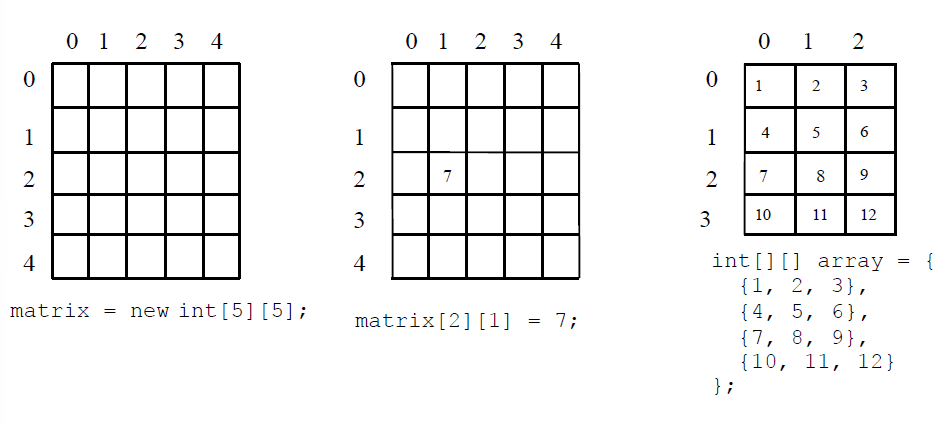
  • 二维数组的基本声明和构建方法
//declare:dataType[][] refVar
//create:refVar = new dataType[][]
int[][] martix = new int[10][10];   //in one step
 
//access:refVar[][]
martix[1][3] = 3;
 
//shorthand notations
int[][] array = {
    {1, 2, 3},
    {4, 5, 6},
    {7, 8, 9},
    {10, 11, 12}
};
//等价于先创建再逐一赋值

  • 对于二维数组int[][] x = new int[3][4]x.length为3,因为x中包含三个行数组,而x[i].length为4,因为每个行数组包含4个元素

Ragged Arrays

  • Ragged Arrays即不规则二维数组,不同的行可以有不同的长度
int[][] triangleArray = {
    {1, 2, 3, 4, 5},
    {2, 3, 4, 5},
    {3, 4, 5},
    {4, 5},
    {5}
};
  • 其每一行的长度不同,所以是ragged arrays

Multidimensional Arrays

  • For example,创建一个三维array
double[][][] scores = new double[10][5][2];
  • 对于多维数组,其长度同样是从左到右去数下一层行数列/元素的数量

(!)Example : Calculating Total Scores

  • 假设总共有7个学生,5次考试,每次考试有2部分
  • 最终需要求得每个学生的总成绩
  • scores[i][j][0/1]表示i学生在j次考试中的0(上)/1(下)部分拿到的成绩
  • 对应的三维数组需要遍历三层
for (int i = 0; i < scores.length; i++) {
    double totalScore = 0;
 
    for (int j = 0; j < scores[i].length; j++)
        for (int k = 0; k < scores[i][j].length; k++)
            totalScore += scores[i][j][k];
}
  • 最终得到每个学生的最终成绩

ArrayList

  • 可动态更改size的一种列表
//声明并创建
ArrayList<String> obj = new ArrayList<String>();
 
//添加元素
add();
//删除元素
remove();
//取得元素
get();
//修改元素
set();
//获取长度
size();
//清空
clear();
//判断是否包含某元素
contain();